Analogue and
digital transmission
In all classic CCTV systems each camera is connected to the
monitor or video-recorder by cables. If the site does not permit running the
cables the only solution is making a wireless bridge installing a transmitter
closed to the camera and a receiver near the monitor/DVR.
Todays there are 2
kinds of Audio/Video transmitters on the market: analogue and digital.
Analogue video transmitters have been very popular for
several years. They transform the analogue video signal of the camera in a RF
modulation.
Digital video transmitters are the
state-of-the-art technology in video transmission. In this transmitters the
analogue video signal is first converted in a digital stream before being
transmitted. The receiver re-decodes the digital stream in an analogue video so
that any TV set, DVR or monitor can be connected. Compared with analogue
transmitters, these digital equipment provide much better RF immunity and 100%
noise-free video.
Difference
between digital transmission of analogue video and Wi-Fi
First of all it must be clear that digital transmitters for analogue video, like RE-DTX, have nothing to do with
Wi-Fi.
Wi-Fi is used by IP cameras that generate a digital video to be
played and managed by computers. On the contrary, in the digital transmitters of
analogue video the digital stream exists only between transmitter and receiver,
while the input from the camera and the output to the monitor are pure analogue
composite video that can be connected to any video equipment like TV sets,
video-recorders, video cameras etc.
Advantages of digital transmission
The recent development of digital transmission dramatically changed the market
of wireless CCTV systems as well as it modified the world of broadcasting TV.
The great advantage of digital RF transmission is that only 1-0 data are
transferred instead of "From..To" values as in the analogue transmitters. For
this reason the digital transmitters provide a clear noise-free video or nothing
at all in case their operating range is exceeded. The "almost clear, so and so
..." area, typical of analogue transmission is not existing.
Besides this
fundamental difference, the digital video is managed by a microprocessor, so
several important features can be added for example in order to improve RF
interference immunity or to avoid unauthorized reception of the transmission.
|
Line of sight
range and indoor range
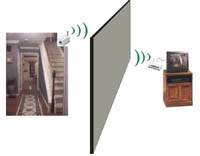 Line
of sight range Line
of sight range
This is
the maximum distance between a camera and receiver when there are no obstacles
between the two, ensuring that the radio waves can travel freely through the
air. The line-of-sight range can be measured fairly accurately using the
appropriate methods. It should however be considered an approximate figure, as
it can vary according to environmental conditions and external interference.
Indoor range
This is the maximum distance between a camera and receiver when there are
various kinds of obstacles in between, such as walls or furnishings. The indoor
range obviously depends on the number and type of obstacles present, as well as
reflections off walls, and is therefore difficult to measure accurately.
|
|
|
Transmission in
line of sight
The range of all DSE audio/video transmitter is always
guaranteed in a line-of-sight condition (no obstacles between
the antennas).
When designing your system, you should attempt to ensure maximum line of sight,
to guarantee the best transmission range.
However obstacles do exist and it is necessary to find a way round them. Every
obstacle inevitably means a certain loss of signal, which is why it is important
to ensure there are not too many, which would lead to a complete loss of signal.
Below are a few indications on how to deal with obstacles. |
|
|
Obstacles to
wireless transmission
What type of obstacles can influence transmission?
TThe obstacles which can influence wireless
transmission from a Radioeye® camera are those located on the imaginary line
between the receiver antenna and the camera antenna. Any other obstacle in the
vicinity, or above or below, will have little influence. This is why the
position of the camera is very important, as moving it by one meter can
sometimes be enough to get around obstacles.
Metallic obstacles
Metal is the only substance commonly present in everyday applications which
is capable of completely screening a wireless signal. If you were to shut a
camera inside a sealed metal container, no signal at all would get through, even
with the receiver right alongside. Fortunately it is rare to come across
obstacles entirely composed of metal, but it is important to look out for large
metal gates or metal shelves. It is also important to remember not to install
the camera inside a metallic “cage” such as a lorry or closed cab, unless you
are able to position the antenna on the outside, as described below.
Non-metallic obstacles
Non-metallic obstacles do not entirely screen wireless signals, meaning that the
signal from a RadioEye camera will pass through. Each obstacle encountered does
however introduce a certain level of signal attenuation. Thicker, denser
obstacles, such as thick cement walls or roofing slabs weaken the signal more
than less dense, thinner materials like wood, plastic etc.
The importance of the location of obstacles
There is a general rule here: the nearer the obstacles are to the transmitter
(the camera), the weaker the signal will be. It is therefore a good idea to
avoid positioning a camera immediately behind a wall (with respect to the
receiver), because the signal would be weakened at the outset. The camera should
be positioned in the most open location possible, pointing towards the receiver
and ensuring there are no large obstacles near the transmitter, where the radio
wave is narrower and it is more difficult to get round obstacles.
|
SLIGHT OBSTACLES WITHOUT CONSIDERABLE INFLUENCE ON
SIGNAL RANGE |
LARGE OBSTACLES WHICH AFFECT SIGNAL RANGE
|
|
Thin partition walls |
External or very thick walls |
|
Plasterboard partitions – Office dividers |
Reinforced concrete pillars – Roofing slabs |
|
Obstacles in plastic, wood or paper |
Metal obstacles – metal doors – sheet metal gates |
|
Obstacles located very close to the receiver |
Obstacles located very close to the camera |
|
Industrial warehouses – buildings with large empty spaces
inside |
Residential buildings – buildings with dense, complex
internal structures |
|
|
|
Maximum
operating distance between camera and receiver
For each wireless
equipment DSE declares an open air, line-of-sight, maximum operating range which
can be achieved without obstacles and in optimal environmental condition. This
figure can be measured quite accurately, but can anyway vary considerably
according to the environment. In the event the presence of obstacles cannot be
avoided please consider the following range reduction:
LINE-OF-SIGHT RANGE
No obstacles between antennas |
RANGE WITH SLIGHT OBSTACLES
Small number of thin walls between antennas |
RANGE WITH CONSIDERABLE OBSTACLES
Considerable number, or thick walls between antennas |
|
Declared by manufacturer |
-30% |
-70% |
|
|
|
Increasing range
with directional antennas
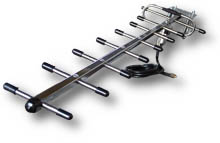 RadioEye®
cameras and transmitters come with omnidirectional antennas which transmit in
all directions. However these can be replaced with a
directional antenna which
transmits in one precise direction. Directional antennas are usually connected
to cameras and pointed in the direction of the receiver. Usually they are
installed outdoor and connected to the camera by means
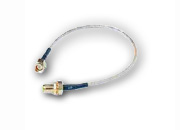
of a
cable (RE-CA4/5/6). RadioEye®
cameras and transmitters come with omnidirectional antennas which transmit in
all directions. However these can be replaced with a
directional antenna which
transmits in one precise direction. Directional antennas are usually connected
to cameras and pointed in the direction of the receiver. Usually they are
installed outdoor and connected to the camera by means
of a
cable (RE-CA4/5/6).
Using a directional antenna increase
considerably the open air range, even over 50%.
The indoor range, is also
improved but the benefit is reduced according to the number of obstacles.
|
 As
a general rule, cameras should not be located close to obstacles as this would
affect the outbound signal at the outset, preventing good signal propagation.
However at times it is impossible to locate the camera in another area, due to
the filming angle required. In this case it might be possible to leave the
camera where it is and position the antenna elsewhere, in order to avoid the
obstacle. We offer specific
As
a general rule, cameras should not be located close to obstacles as this would
affect the outbound signal at the outset, preventing good signal propagation.
However at times it is impossible to locate the camera in another area, due to
the filming angle required. In this case it might be possible to leave the
camera where it is and position the antenna elsewhere, in order to avoid the
obstacle. We offer specific 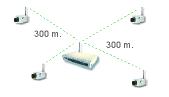 The
optimum position for cameras, ensuring best performance, is in a circular
pattern around the receiver, if possible with cameras equidistant from the
receiver. In this way you can exploit the maximum range of the system (e.g.
150 m in one direction and 150 m in another), and the cameras, being offset,
ensure the best possible transmission quality.
The
optimum position for cameras, ensuring best performance, is in a circular
pattern around the receiver, if possible with cameras equidistant from the
receiver. In this way you can exploit the maximum range of the system (e.g.
150 m in one direction and 150 m in another), and the cameras, being offset,
ensure the best possible transmission quality.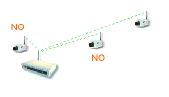
 Do
not locate two cameras in line
Do
not locate two cameras in line